

How to Create Product Photos with AI Tools For Professional AI Product Photography
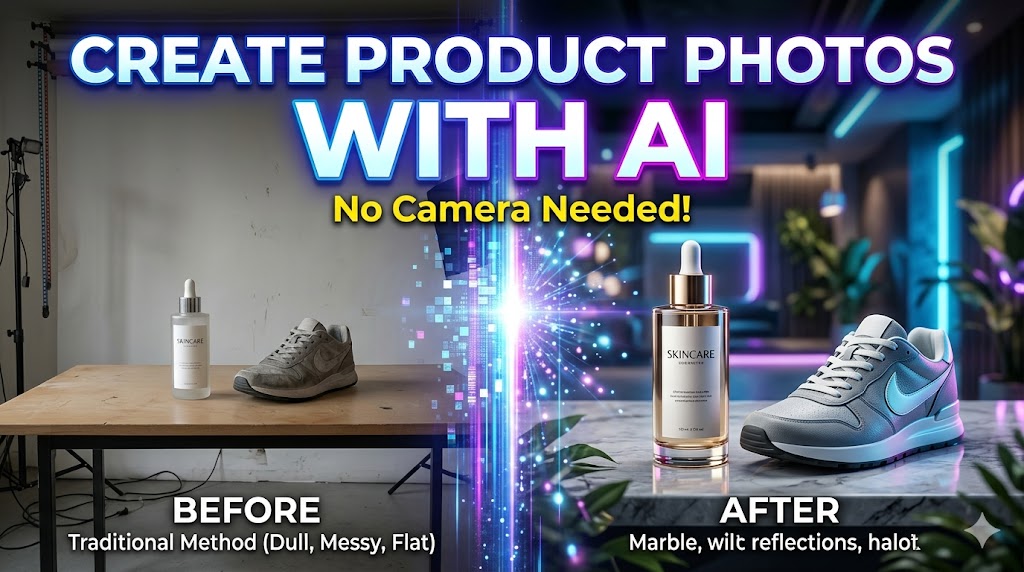
In today’s digital marketplace, visuals are everything. Whether you run an online store, sell on social media, or manage a brand website, your product photos decide whether customers trust your business or scroll past it. Traditionally, creating professional product photography required expensive cameras, lighting setups, studio rentals, and sometimes even professional photographers. But now, things have changed completely with the rise of AI tools.
AI product photography is revolutionizing how businesses create visuals. With just a simple product image or even a text prompt, AI tools can generate stunning, studio-quality product photos in seconds. You no longer need a physical studio or expensive equipment. Instead, you can create clean, modern, and highly converting product images right from your laptop.
This guide will walk you through everything you need to know about creating product photos using AI tools, even if you are a complete beginner.
Why AI Product Photography is a Game-Changer
Before jumping into the process, it’s important to understand why AI-generated product photos are becoming so popular.
First, they save time. A traditional product photoshoot can take hours or even days, depending on setup and editing. AI can produce multiple variations of product images in just minutes.
Second, they reduce cost. Small businesses often struggle with marketing budgets. AI tools remove the need for photographers, studios, and expensive editing software.
Third, they provide flexibility. You can instantly change backgrounds, lighting styles, or even create seasonal themes like “summer sale” or “winter luxury collection” without reshooting anything.
Finally, AI gives you creative freedom. You can visualize your product in any environment imaginable—on a beach, in a luxury studio, floating in abstract art, or placed in a modern lifestyle setting.
Step 1: Choose the Right AI Tool for Product Photography
The first step is selecting the right AI tool. There are many AI platforms available today that specialize in image generation and editing. Some tools focus on text-to-image generation, while others are designed specifically for e-commerce product visuals.
When choosing a tool, look for features like:
- Background removal and replacement
- High-resolution output
- Product realism enhancement
- Prompt-based image generation
- Mockup and lifestyle scene creation
Popular AI tools in this category allow you to upload your product image and transform it into a professional advertisement-style photo.
The key is not to rely on just one tool. Many creators combine multiple tools—one for generating backgrounds, another for enhancing quality, and another for final polishing.
Step 2: Prepare Your Product Image Properly
Even though AI is powerful, your input matters a lot. If your base product image is unclear, low-quality, or poorly lit, the final result will also suffer.
Take a clean photo of your product with a plain background. It doesn’t need to be professional, but it should be well-lit and clearly visible. Make sure the product is centered and not blurred.
If you don’t have a real product photo, some AI tools even allow you to generate a product from scratch using text prompts. However, using a real image usually gives more realistic results.
Step 3: Remove Background Using AI
One of the most powerful features in AI product photography is automatic background removal. Instead of manually using Photoshop, AI tools can instantly detect your product and separate it from the background.
Once the background is removed, you get a clean cutout of your product. This becomes your base layer for creating new visuals.
At this stage, your product is ready to be placed in any environment you want.
Step 4: Generate Lifestyle Backgrounds with AI Prompts
Now comes the creative part. Instead of using plain white backgrounds, AI allows you to create realistic lifestyle environments.
For example, if you are selling a skincare product, you can place it in a soft, natural spa environment. If you are selling shoes, you can place them on a city street or gym floor. If it’s a tech gadget, you can place it in a futuristic neon setup.
You simply enter a prompt like:
“A luxury skincare bottle placed on a marble table with soft natural lighting, aesthetic spa environment, shallow depth of field, ultra realistic photography style”
The AI then generates a background that matches your product perfectly.
This step alone can completely transform how your product looks online.
Step 5: Blend Product with Background Naturally
A common mistake beginners make is placing the product on a background without adjusting lighting or shadows. This makes the image look fake.
Good AI tools automatically blend shadows, reflections, and lighting to make the product look naturally placed in the environment.
You should ensure:
- Light direction matches the background
- Shadows are soft and realistic
- Product edges are not overly sharp
- Colors are balanced
This step is what makes AI images look professional instead of artificial.
Step 6: Enhance Image Quality with AI Upscaling
Once your image is ready, you can enhance it further using AI upscaling tools. These tools improve resolution, sharpness, and fine details.
This is especially useful for e-commerce platforms like Amazon, Shopify, or Etsy, where high-resolution images improve customer trust and conversion rates.
AI upscaling can turn a simple image into a 4K or even 8K-quality product photo without losing clarity.
Step 7: Create Multiple Variations for Marketing
One of the biggest advantages of AI tools is the ability to generate multiple variations of the same product image.
Instead of using one photo, you can create:
- White background version for e-commerce listings
- Lifestyle version for Instagram ads
- Luxury version for branding
- Seasonal version for promotions
This helps you maintain a consistent but dynamic marketing strategy across platforms.
Step 8: Optimize for E-Commerce and Social Media
After generating your AI product photos, the final step is optimization.
For e-commerce websites, keep images clean, professional, and distraction-free. For social media, you can be more creative with backgrounds and storytelling.
Make sure your images are properly sized:
- Square format for Instagram
- Horizontal for websites and banners
- Vertical for reels and ads
Also compress images slightly without losing quality to improve loading speed.
Benefits of Using AI for Product Photography
AI product photography is not just a trend—it is becoming the new standard for online businesses.
It offers several long-term benefits:
- Faster content creation
- Lower production cost
- Unlimited creative possibilities
- Better marketing performance
- Easy scaling for large product catalogs
Even small businesses can now compete with big brands by producing studio-quality visuals.
Final Thoughts
AI tools have completely changed the way product photography works. What once required expensive setups and professional skills can now be done in minutes using smart AI platforms. Whether you are a beginner, entrepreneur, or digital marketer, learning how to create product photos with AI can give you a huge advantage in today’s competitive online market.
The key is not just using AI, but using it creatively. Exp
Leave a Reply