Right now, the Me To My Pasandida Reel CapCut template is going viral. A lot of people are using this template to edit their videos and share them on social media — especially on Instagram, where it’s trending the most.
Let me explain how it works.
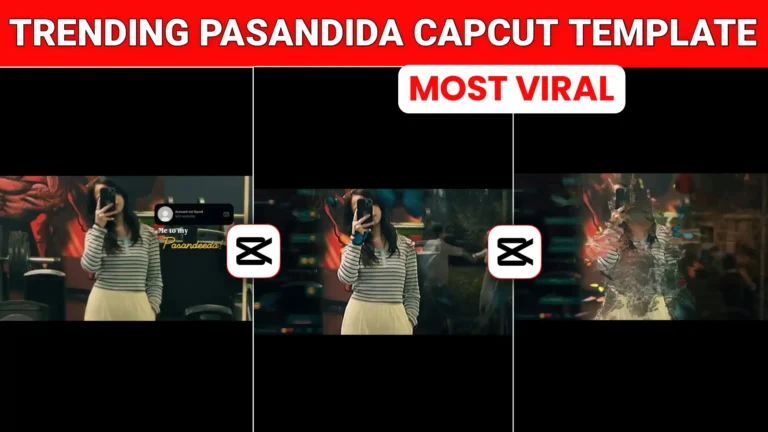
In this reel, your photo or video appears on the screen. On the left side, there’s a WhatsApp chat between you and your girlfriend or boyfriend, slightly blurred so it’s not fully readable. On the right side, there’s a clip showing happy couple moments — romantic scenes where couples are enjoying time together and expressing love.
That’s the basic format of the video.
Many people are adding their own video clips to make it more personal, while others are simply using their photos. If you have a video, you can use that. If you only have photos, that works perfectly fine too. The process is exactly the same in both cases.
Now, let’s go step by step and I’ll show you how you can create this type of video yourself.
Me To My Pasandida Reel Capcut Template
The video starts with a burn transition effect, followed by your uploaded photo or video appearing with smooth effects, and most people usually add their own photo here. On the right side, the text “Account Not Found” shows up—just like when someone blocks you on Instagram—and below it, it says “To My Favorites.” As the reel continues, two different clips play alongside your photo or video: on the left, there’s a slightly blurred screen recording of old chats between you and your partner, and on the right, romantic couple moments are shown with happy, loving scenes. Butterfly animations fly across the screen, adding an emotional touch, and in the end, everything turns into dust with a dust particle effect, bringing the video to a dramatic close.
How to use My Pasandida Reel Capcut Template
If you also want to create a video using the “Me to My Favorite CapCut” template, don’t worry — I’ll explain it in a simple way. Just read this guide from start to finish, and you’ll be able to make your own trending video that’s currently going viral on social media. First, click on the “Use This Template” button given above. As soon as you tap it, you’ll be redirected to the CapCut app. Once the app opens, select your own photo or video from your gallery. After choosing your media, click on the “Next” button and wait a few seconds. The processing time will depend on your internet speed. Shortly after, your video will be ready to preview. You can watch it, and if you like it, simply tap on the “Export” option to save it directly to your phone’s gallery.
Is This Guzare The Jo Lamhe Template
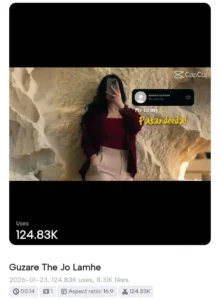
To be honest, the real name of this CapCut template is Guzare The Jo Lamhe. Many people think the template is called “Me To My Favorite,” but that’s actually not correct. The confusion happens because the word “Favorite” appears in the video, so viewers assume that’s the name of the trend. In reality, a lot of creators are using the Guzare The Jo Lamhe template and then adding different songs of their choice—some prefer soft or light romantic tracks to match the emotional vibe. So the trend isn’t named “Me To My Favorite”; that’s just text shown in the video. The actual template name is Guzare The Jo Lamhe. I hope this clears up any confusion and helps you understand it properly.
Conclusion
I’ve explained everything step by step, so if you follow the same process, you’ll be able to create this trending video very easily. It’s currently going viral on Instagram, and the “Me To My Pasandida Reel” CapCut template I mentioned will help you make the exact same type of reel. If you come across any other trend on Instagram or any other platform and want its CapCut template, just let us know in the comments. We’ll create a new article and share the template with you. And if you’re interested in getting the VN template code for this trend as well, you can comment and tell us — we’ll provide that for you too.
- Bairan Capcut Template Link 2026 (100% Working)
- Two Sides Capcut Template Link 2026 (100% Working)
- Halka Halka Capcut Template Link 2026 (100% Working)
- Happy Holi CapCut Template 2026 (100% Working Link)
- First Kiss Song Reels Capcut Template | X Remix Trend Capcut Template
- Kya Baat Hai CapCut Template 2026 | X Remix Trend Template
- Just a Boy God in Car Capcut Template | Bhgwan Ji in Car Template
- Maduro Trend Capcut Template 2026 | Who Protect You Template
- AA 23 Theme CapCut Template 2026 | Character Intro Capcut Template
- Me To My Pasandida Reel Capcut Template | Halka Halka Song Template